Applications
CaféConnect
A directory of cafés worth working from, with WiFi strength, power sockets, seating, noise and coffee prices on each listing. The web app and a documented, JWT-secured REST API share one dataset, with an admin role for curation.
Live demoSample data, reset nightlyWeb and API
// All listings are sample data
- Platform
- Web, mobile-firstResponsive from phone to desktop
- Built with
- Python, Flask, SQLAlchemy, PostgreSQL and JWT
- Access
- Sign in to postEdits and deletes for admins
- Status
- Live demoSample data, reset every night
Why it exists
A seat, a socket
and WiFi that holds.
Finding a café to work from is a gamble: you want to know about the WiFi and the sockets before you walk in. CafeConnect puts both on each listing. The cafés are sample data. Everything around them is real: sign-in, reviews, admin curation and the API underneath, which I built from scratch in Flask.
One dataset, two doors
The web app and the JSON API read and write the same database, so a café added through one shows up in the other.
Two ways to sign in
The web app keeps a server-side session through Flask-Login. The API hands out stateless JWT bearer tokens, and both answer to the same admin role.
Checked on the way in
Requests are rate limited with Flask-Limiter, and input is validated before anything is saved: marshmallow on the API, WTForms on the web forms.
The REST API
Sign in to add.
Admin to change.
Signing in to the API returns a JWT, and each request carries it as a bearer token. Anyone with an account can add a café. Editing or removing one takes an admin's token, which keeps the directory intact.
Any signed-in user
Authorization: Bearer <token>- GET
/api/cafesList and filter the directory - POST
/api/cafesAdd a café
Admins only
AdminAuthorization: Bearer <admin token>- PUT
/api/cafes/<id>Edit a listing - DELETE
/api/cafes/<id>Remove a listing
The full reference lives in API.md in the project repository (opens in a new tab).
Product tour
Find a table.
Then add your own.
// 01
Find
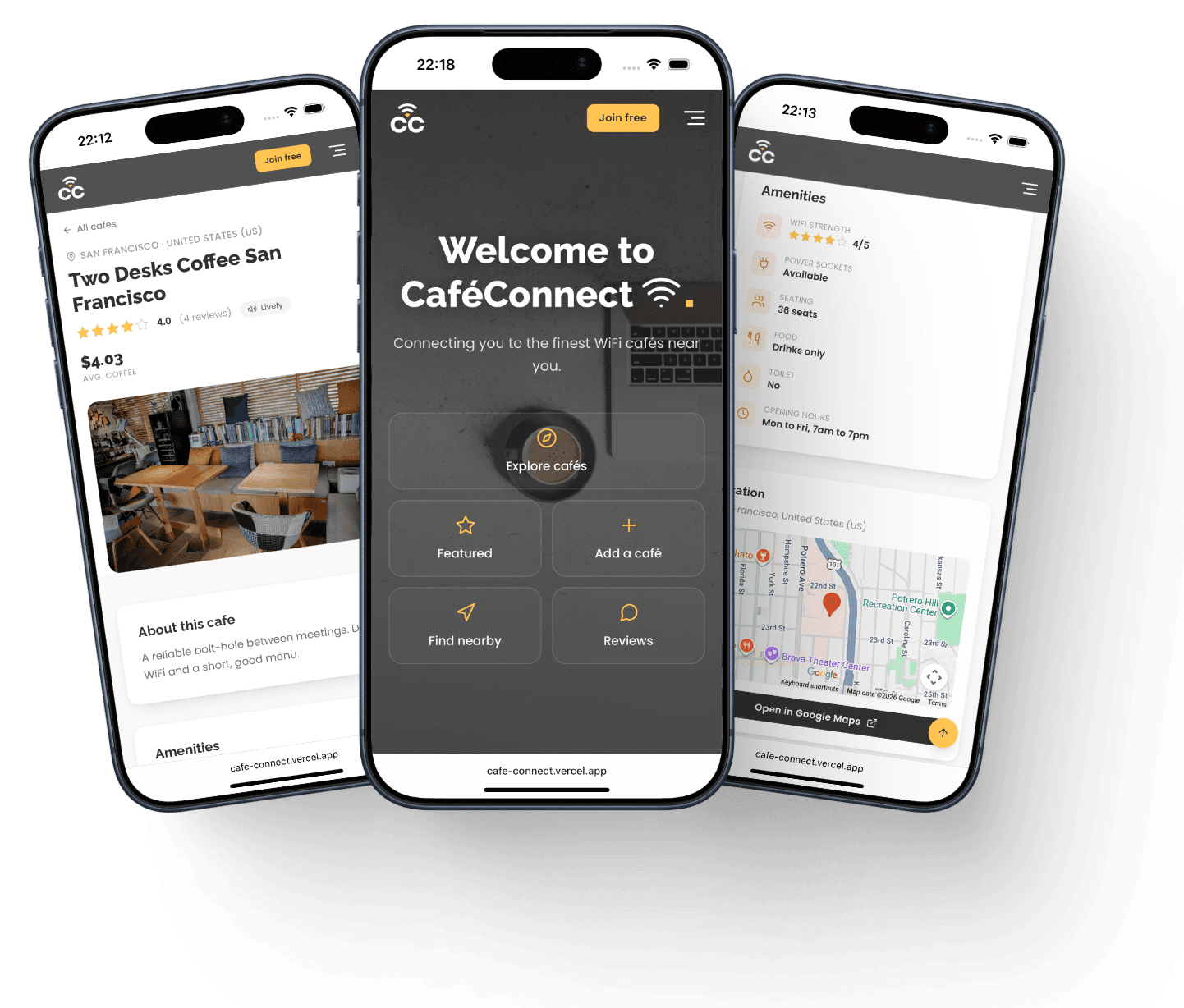
Search, city, WiFi, sockets and food all narrow the same collection. Nearby asks the browser for a location and sorts the cafés by distance from it.


// 02
Decide
One café, one page: the amenities, a live map and the ratings other people left. Reviews are posted from the same page and land in the shared dataset.


// 03
Contribute
Signing in unlocks the add-a-café form. A Google Maps link fills in the name and city, and a preview builds the Browse card as you type. Admins add the photos, and only admins see Edit and Delete on a listing.


Have a look
around.
The live demo runs the same Flask app and API. Its sample data resets every night, so go ahead and add a café or leave a review.
Source code available on request